open image in lightbox

How To cinnamon Part 1: Alarms and Messages

Introduction

Message and event handling in cinnamon is currently based on the TwinCAT 3 EventLogger. This is well integrated into the TwinCAT ecosystem and enables the easy generation of alarms and messages on the HMI.

The event classes in cinnamon are therefore essentially just wrapper classes around the TwinCAT 3 EventLogger objects, which they equip with additional functions and the interfaces required by cinnamon. As with the EventLogger, a distinction is made between alarms and messages. While messages can simply be triggered and do not require a response from the operator, alarms must be acknowledged by the operator. If necessary, stop categories can be defined for alarms, which, in combination with cinnamon OpMode handling, cause a machine to stop at different speeds.

Message services are used to manage alarms and events. These services handle thrown events independently. They also implement an observer pattern that users can subscribe to. Every time an alarm is thrown or cleared, they notify all subscribers by calling notify methods.

The message and event handling includes three cinnamon libraries:

  • Message Interfaces

  • Message Services

  • Concrete Messages

Creating an alarm for the EventLogger

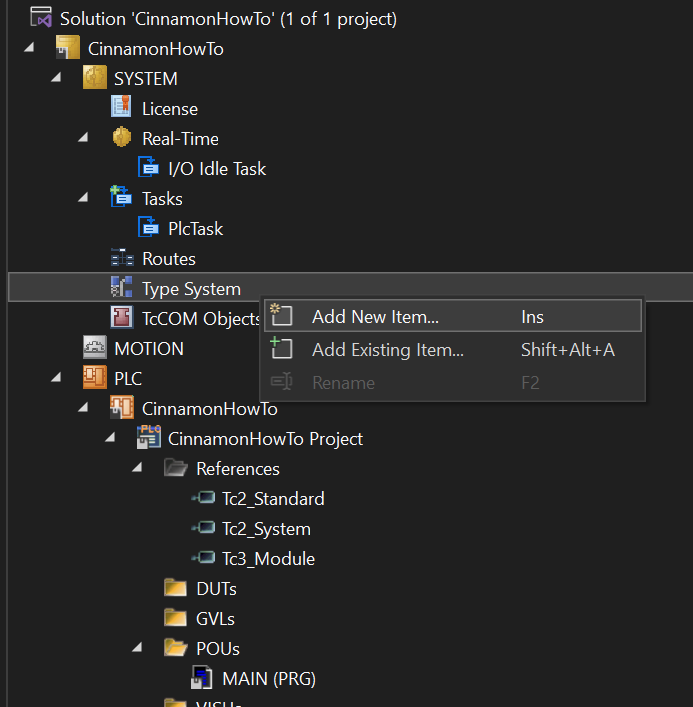
Right click on Type System and add a new item. It will open a save dialog for a new *.tmc file.

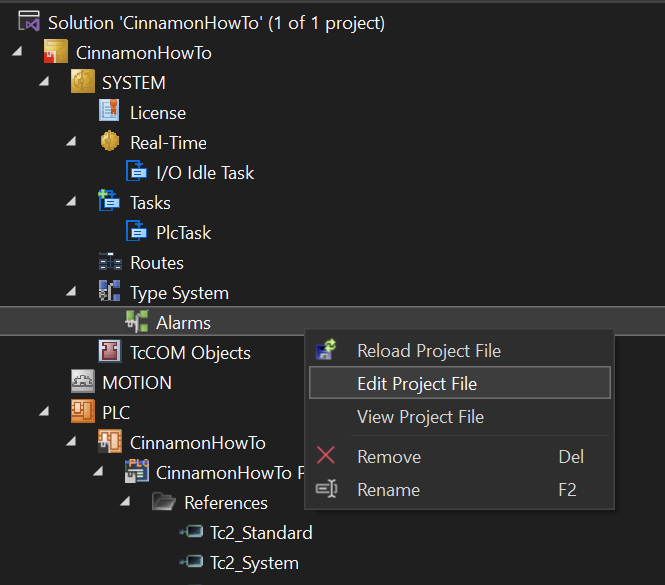
Then right click on the new TMC file in the Type System and select Edit Project File.

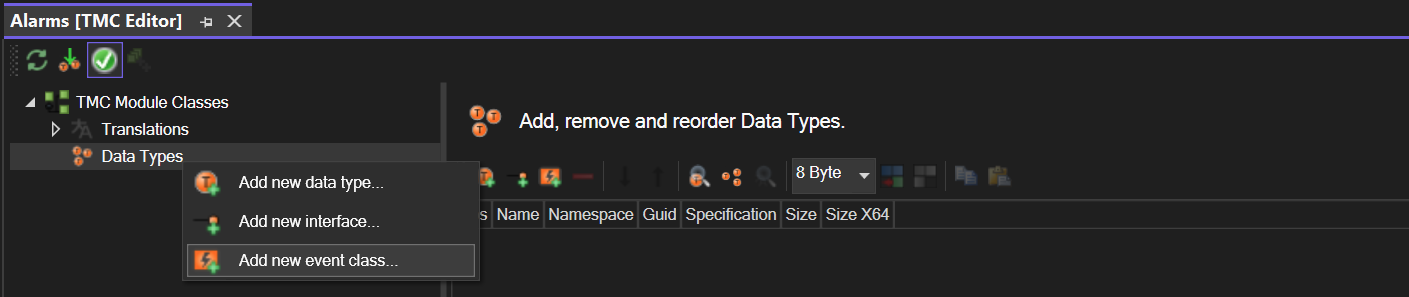
Add a new event class and give it a meaningful name.

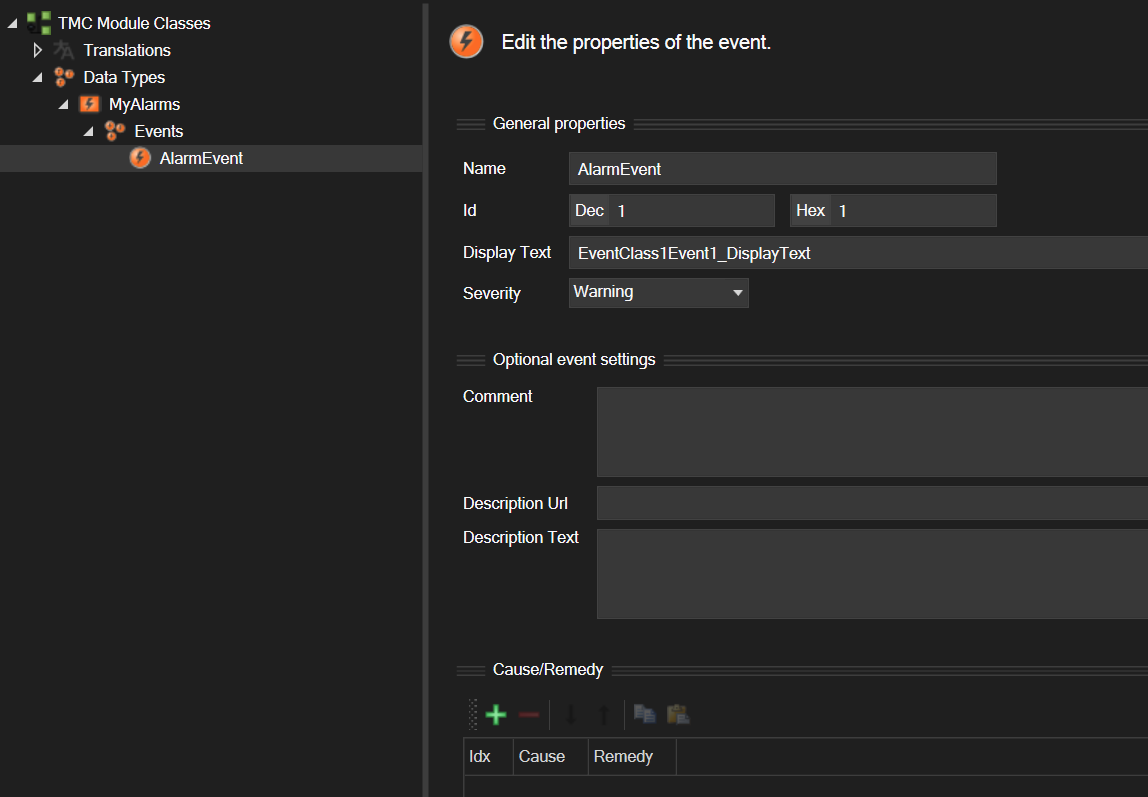
The new class already has an event. If needed, more can be added by right clicking on the Event Class.

After a build, the event classes and structs are available via Global.TC_EVENTS.

For library projects, it is required to create an ExternalTypes.tmc file in order to access the library events inside another project.

How it works

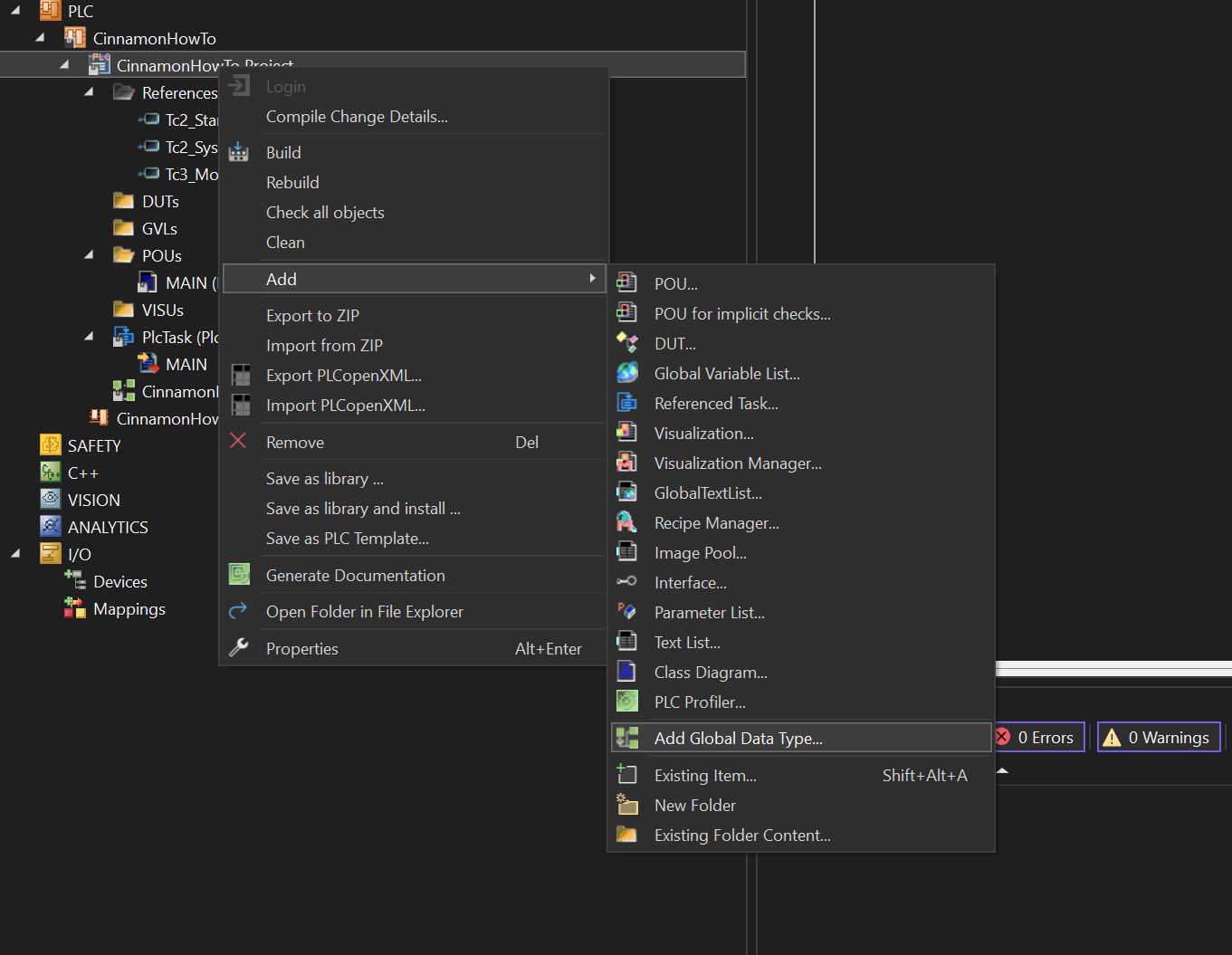
Right click on the PLC project and add a Global Data Type.

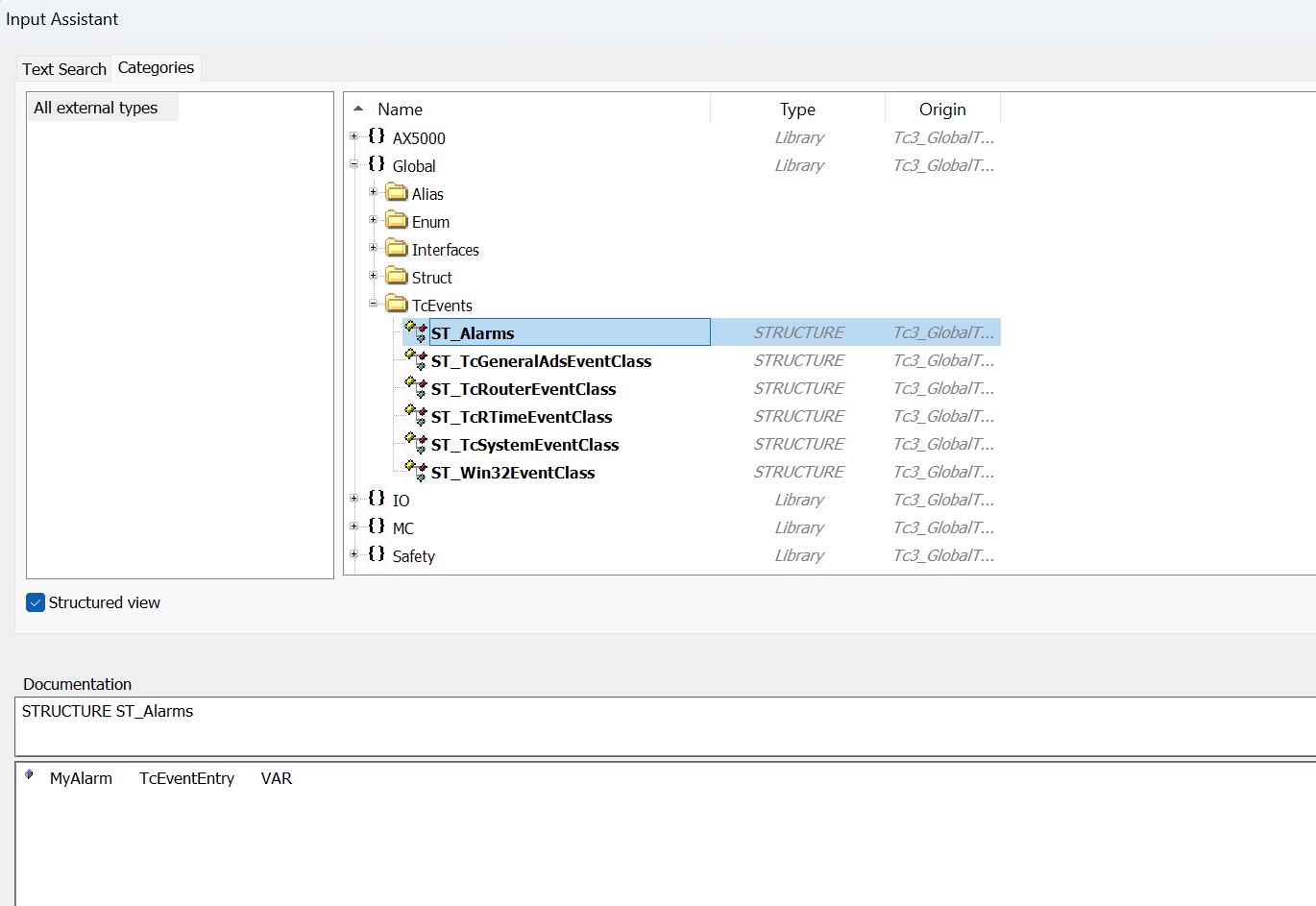
Select the structure with the name of your event class (the ST_ prefix is automatically added).

cinnamon

There are currently two event classes within the cinnamon framework:

  • TcMessage

  • TcError

The Tc prefix indicates that both are wrappers for the corresponding EventLogger classes FB_TcMessage and FB_TcAlarm.

Declaration

Both classes expect identical parameters for the FB_Init method. The first is the specific event of type TcEventEntry. This must not be null. The second parameter, however, is optional and can be used to inject a specific message service (which must implement the CNM_MessageInterfaces.IMessageService interface). The event then reports to this service accordingly. If no service is injected (injectedService := 0), the global message service is used by default.

myError :CNM_ConreteMessages.TcError(Global.TC_EVENTS.Alarms.myError, 0);
myMessage :CNM_ConreteMessages.TcMessage(Global.TC_EVENTS.Alarms.myMessage, 0);

If an event belongs to a function group, function unit, or device driver, it can notify the associated node of the event's occurrence. Each node has a NodeMessageService that manages the corresponding HMI states for the node and forwards the event to the global message service.

This means that node-specific errors, such as a timeout for a cylinder or an invalid axis position for an axis driver, are handled within the node using the node's message service:

timeoutError :CNM_ConcreteMessages.TcError(
    Global.TC_EVENTS.CylinderErrors.TimeoutExtend, 
    THIS^.messageService
);

Error handling

One of the core concepts behind cinnamon's custom event mechanisms was to make error handling as hassle-free as possible. Errors should be able to be thrown from anywhere in the code according to the "fire-and-forget" principle, so that you don't have to periodically poll for the current HMI status. By default, the global message service handles clearing the errors as soon as they have been confirmed by the user. This means that to throw an error, it is sufficient to simply call the throw() method once. Of course, you still have the option to clear errors from the PLC by calling the clear() method once.

If an error is linked to a specific cause and may only be cleared once that cause has been resolved, you can block the error. To do this, set the canBeClearedAutomatically property to FALSE. The global message service will then not automatically clear it, even if it has been confirmed by the operator. Only once canBeClearedAutomatically is set to TRUE again will the error be removed from the HMI and cleared.

By default, canBeClearedAutomatically is TRUE.

StopCategories

Alarms define stop categories that control machine behavior:

  • DONT_STOP does not trigger a stop and the machine keeps running.

  • STOP_AT_END_OF_CYCLE requests a stop after the current process finishes cleanly, where cycle refers to the current process and not the PLC task cycle.

  • STOP_IMMEDIATELY aborts operating modes immediately and calls stopImmediate() on all nodes.

  • DISABLE_MACHINE also aborts operating modes immediately and calls disable() on all nodes.

TYPE AlarmStopCategory :
(
	(*do not react to the error*)
	DONT_STOP,
	(*trigger a stop at end of cycle*)
	STOP_AT_END_OF_CYCLE,
	(*stop the machine immediately*)
	STOP_IMMEDIATELY,
	(*disable the machine*)
	DISABLE_MACHINE
)DINT;
END_TYPE

The OpmodeHandler is subscribed to the global message service and reacts according to the respective stop category. By default, the stop category is initialized from the injected event severity: INFO, WARNING, and VERBOSE map to DONT_STOP; ERROR maps to STOP_AT_END_OF_CYCLE; and CRITICAL maps to STOP_IMMEDIATELY. The stopCategory property exists on every alarm and can be adjusted at runtime via its setter; DISABLE_MACHINE must be set explicitly via a property.

Automatic Error Handling with CycleManager

CycleManager streamlines error handling by letting you call cycleManager.handle(error): it throws the error once, periodically checks whether it’s still pending, and automatically transitions when it’s cleared. If the previous step evaluated the error, handle can return to that step. And when you call cycleManager.handle(error, resumeWithLastStep := FALSE), CycleManager resumes with the next step once the error is cleared—behaving like cycleManager.evaluate(SUCCESS).

VAR_INST
    pusherTimeoutError :CNM_ConcreteMessages.TcError(
        GLOBAL.TcEvents.Alarms.PusherTimeout, 
        THIS^.messageService
    );
END_VAR

EXTEND_PUSHER:
    (* if the pusher.extend() method returns ERROR, the cycleManager will 
    transit to the step PUSHER_TIMEOUT *)
    cycleManager.evaluate(
        state := THIS^.pusher.extend(execute := cycleManager.executeStep),
        errorStep := PUSHER_TIMEOUT
    );
(* there can be a couple of other Steps in between *)
PUSHER_TIMEOUT:
    (* handle throws the error, checks the isPending property of the event. 
    if the error is not pending anymore, the cycleManager will automatically 
    proceed with the step EXTEND_PUSHER and retry the command *)
    cycleManager.handle(pusherTimeoutError);

If the canBeClearedAutomatically property is set to FALSE, the handle method will starve until it is set to TRUE and the event is acknowledged. Ensure that in the handle step no timeout is set.

Message Services

Message services manage raised events and their exact behavior depends on the specific implementation. Each service follows an observer pattern so clients can subscribe or unsubscribe and will be notified whenever alarms or messages are raised or cleared. The global message service periodically checks whether an alarm has been acknowledged and clears it accordingly, while each node exposes an internal message service that maintains the node’s HMI signal flags. The GlobalMessageService provider class makes the global service accessible application-wide; to access it, declare a local instance of CNM_ConcreteMessages.MessageServiceProvider(0). This provider exposes two members—messageObserver for subscribing to notifications about raised or cleared events, and messageService for interacting with the global message service (e.g., clearing all messages or checking if any are pending).

The run method of the global message service is called automatically within CNM_OpmodeHandling.BaseHmi. If BaseHmi is not used, the global message service's run method must be called explicitly once per PLC cycle.

Aufruf von GlobalMessageService.run in MAIN()

VAR
    globalService :CNM_MessageServices.GlobalMessageService;
END_VAR

globalService.run();